I build apps for
phones and computers.

At the moment there are two of them: Call Guardian, which deals with the calls you don’t want, and Radio Mondi, which plays radio from anywhere. Neither one asks you to make an account, and neither sends anything back to me, because there is no server of mine for it to send anything to.

  • Android
  • Windows
  • Ubuntu
  • 10 and 16 languages
A desk with a code editor open, a handheld console, a lit keyboard, and the EMU logo on the wall behind it.
The banner I use everywhere else, for once at full size.
Apps
2
Countries of radio
187
Languages
26
Accounts needed
0

The apps

Two of them. Both finished, both still maintained, each with its own site.

Android

Call Guardian

Call Guardian decides what to do with a call before the phone rings. Your contacts get through. Unknown numbers get screened, and when the app can’t tell either way, Gatekeeper asks the caller to do something an auto-dialler won’t bother doing.

All of that happens on the phone. No number is sent anywhere, there is nothing to sign up for, and it works with the dialer you already have. There are three modes, from contacts-only to no filtering at all, and a schedule that can tighten the mode by itself during meetings or at night.

It also has a Ghost Call. Shake the phone and it rings, with background noise and a voice on the other end, for when you need a reason to leave a room.

  • Gatekeeper
  • Ghost Call
  • Bio-Lock
  • Meeting Shield
  • Night Shift
  • Per-contact rules
Platform
Android
Languages
10, Arabic included
Internet
Not needed
Account
None

Worth knowing. Android only shows normal phone calls to screening apps, so WhatsApp, Signal and the rest of the VoIP calls go straight through. No app can filter those, mine included.

callguardian.samcloud.online
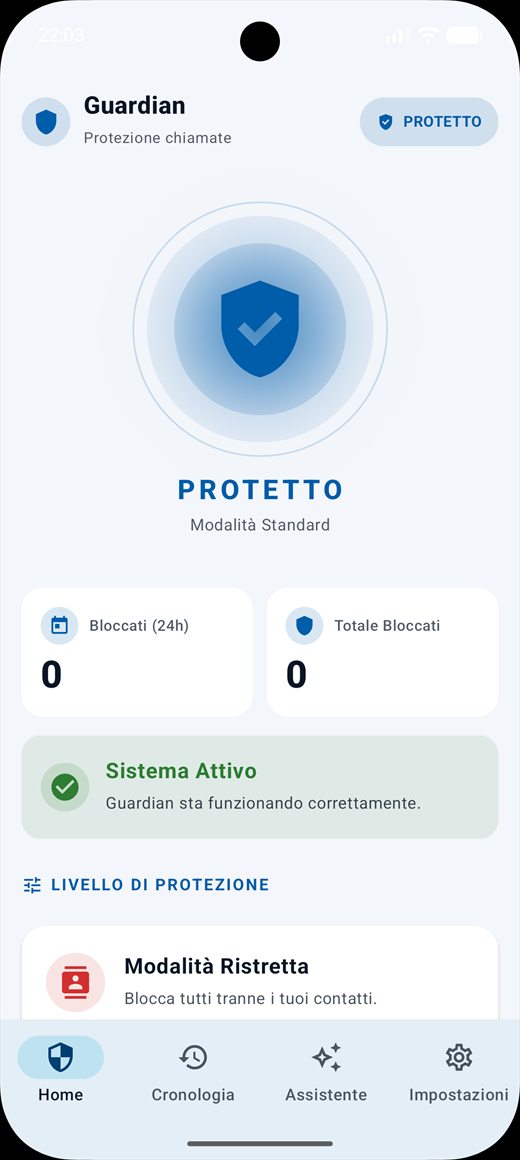
Call Guardian's home screen, showing the current protection mode and the number of calls blocked.

Windows and Ubuntu

Radio Mondi

Radio Mondi gets a station playing in two clicks. Italian stations sorted by genre and region first, then the rest of the world, 187 countries of it. The list comes from radio-browser.info and updates itself, so I don’t have to keep it by hand.

It also holds your podcasts, picking an episode back up where you left it even after you’ve closed the program, and it plays the music already sitting on your disk: point it at a folder and the folder becomes a playlist.

Then the small things, which took the longest. An alarm that wakes you to a station and raises the volume slowly. A recorder: one red button while you listen, and the broadcast lands in a file in the folder you chose, in the format it arrived in. Ten equalizer bands from 31 Hz to 16 kHz. A sleep timer that fades out in the evening.

  • 187 countries
  • Podcasts
  • Your own music
  • Alarm
  • Recorder
  • Equalizer
  • Sleep timer
Windows
Installer, 149 MB
Ubuntu & Debian
.deb, 29 MB
Languages
16
Price
Free on desktop

Worth knowing. It doesn’t sync between your devices, for the same reason it doesn’t track you: there is no server of mine to sync with. And it streams podcasts rather than downloading them. The phone versions will do that instead, and they aren’t out yet.

radio.samcloud.online
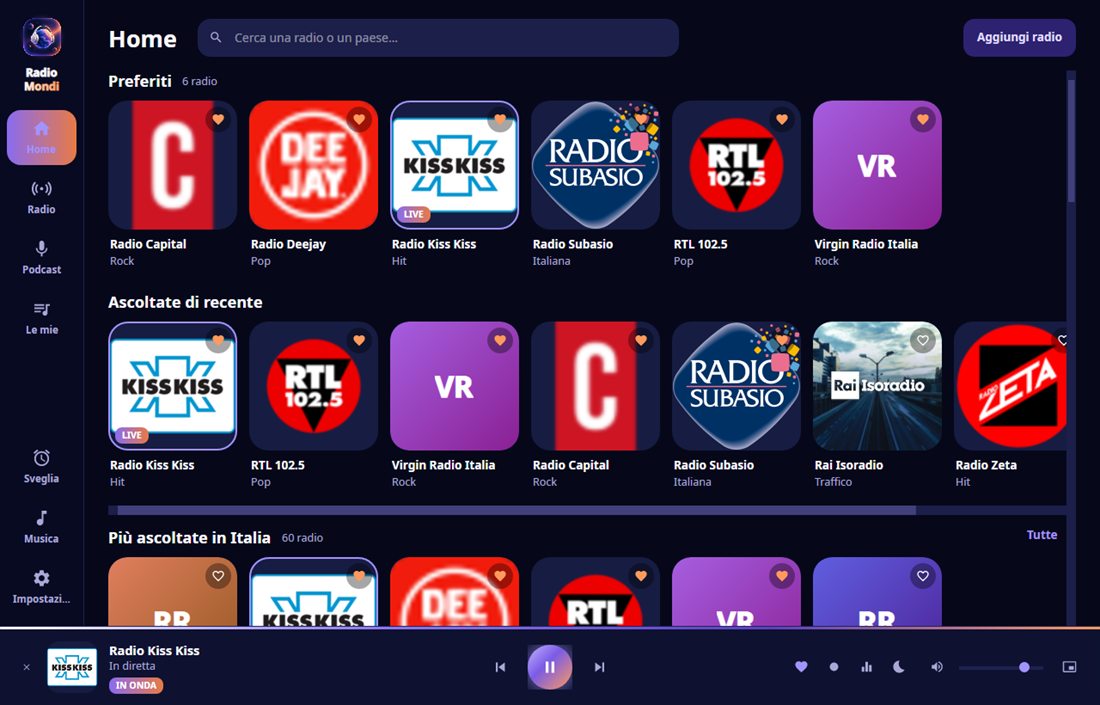
Radio Mondi's home page: favourites at the top, then what you listened to recently, then the popular stations in your country.

How I work

Decisions I took at the start and haven’t had a reason to go back on.

  1. Nothing leaves your device

    If a decision can be taken on the phone, it is taken there. Call Guardian filters every call locally. There is no point in that process where a number of yours travels anywhere.

  2. No account

    Nothing to sign up for and nothing to forget, which also means nothing of yours to lose when someone breaks into a database somewhere.

  3. No ads, no analytics

    No usage statistics, no crash reports, nothing counting what you open. If something breaks I only find out when you tell me, and that is the trade I chose.

  4. Translated properly

    Ten languages in Call Guardian, sixteen in Radio Mondi, right-to-left included. They go in while the feature is being written, not in a patch six months later.

  5. I run the servers

    Every site here is an nginx container behind a Traefik router on a machine I own. Nothing sits on someone else’s platform, so nothing disappears when a platform changes its terms.

  6. The sites stay plain

    Hand-written HTML and CSS, no framework and no build step. Turn JavaScript off and every page here still reads from top to bottom.

samuele@emu: ~/sites
$ ls
callguardian.samcloud.online
radio.samcloud.online
www.samcloud.online

$ cd www.samcloud.online && docker compose up -d
[+] Running 1/1
 ✓ Container emu-site  Started

$ curl -s -o /dev/null -w '%{http_code}' https://samcloud.online
200

$ 

Tools

The apps are half the work. The other half is the machine they land on.

Apps AndroidKotlinDesktop, Win and Linux Audio and streamingOffline firstTranslation, RTL
Servers DockerTraefiknginx KeycloakWebSocketsLet’s Encrypt Linux
Web HTMLCSSPlain JavaScript Accessibility

Where the name comes from

EMU is short for emulation. I grew up with the machines people now emulate, and taking one apart to work out what it was doing is how I ended up writing software at all. The invader has been on the icon since the first version and it isn’t going anywhere.

None of that shows up in the two apps above, which are about calls and radio. But it is why the studio is called what it is called, and why a site about a call filter has an arcade on it.

A laptop with code on the screen, a phone showing the app stores, and a notebook with Ideas, Apps, Games written on it.

About

I work on my own. That keeps the apps small and the decisions quick, and it means there is nobody above me who can decide to put an advert in your call screen or a tracker in your radio.

It also means they are finished before they are announced, which is why there are two of them and not ten. Each has its own site, its own privacy policy and its own documentation, in the language you already speak.

I take on work of the same shape: Android apps, small desktop tools, and keeping self-hosted things running once they exist.

  • Works in Kotlin, JavaScript, Shell, Docker
  • Open to App builds, self-hosting, long maintenance

Something you want built?

Tell me what it has to do and I will tell you honestly whether I am the right person for it. If I am not, I usually know who is.

English or Italian